 look news india

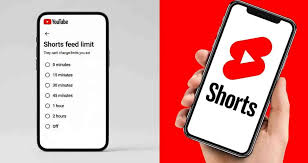
News India Live, Digital Desk: The addiction of watching short-form videos on social media i.e. ‘Doomscrolling’ has become a big problem for today’s youth. Taking this problem seriously, Google-owned YouTube Has introduced a revolutionary feature. Now users can completely disable or block YouTube Shorts as per their choice. For this, the company has included in its ‘Time Management’ tool. ‘0-minute’ Time limit option has been added.
What is this ‘0-minute’ time limit feature?
Earlier, there was a minimum time limit of 15 minutes to watch shorts on YouTube. But now after the new update, if you want to exceed your daily limit. 0 minutes If you set it to , the app will effectively remove the Shorts section from your Home Feed. As soon as you click on the Shorts tab, you will see a message that you have reached your daily limit, saving you from endless scrolling.
Step-by-step process to enable this feature:
If you are also troubled by shorts addiction and want to activate this feature, then follow these easy steps:
Open the YouTube app: Open the latest version of YouTube app on your smartphone.
Go to profile: Click on your profile photo (You Tab) located at the bottom right.
Settings: Tap on the ‘gear’ icon (Settings) at the top right.
Time Management: Here you will get the option of ‘Time Management’, click on it.
Shorts Feed Limit: Scroll down and enable ‘Shorts feed limit’.
Set 0 minutes: From time limit options ‘0 Minutes’ Select and save.
Why is this change necessary to get rid of addiction?
Many recent researches have revealed that short-form videos increase the level of ‘Dopamine’ in the brain, due to which the person keeps scrolling without thinking for hours. This new feature of Google will prove to be a boon for those who:
Unable to focus on your studies or work.
Those who have the habit of watching shorts for hours before sleeping at night.
Who want to reduce their screen time.
Will this eliminate shorts forever?
Note that this feature doesn’t delete shorts completely, but rather ‘hides’ them from your feed. If you want to watch shorts again, you’ll have to go back into Settings and remove or increase this limit. This feature is currently rolled out for mobile apps (Android and iOS).