 look news india

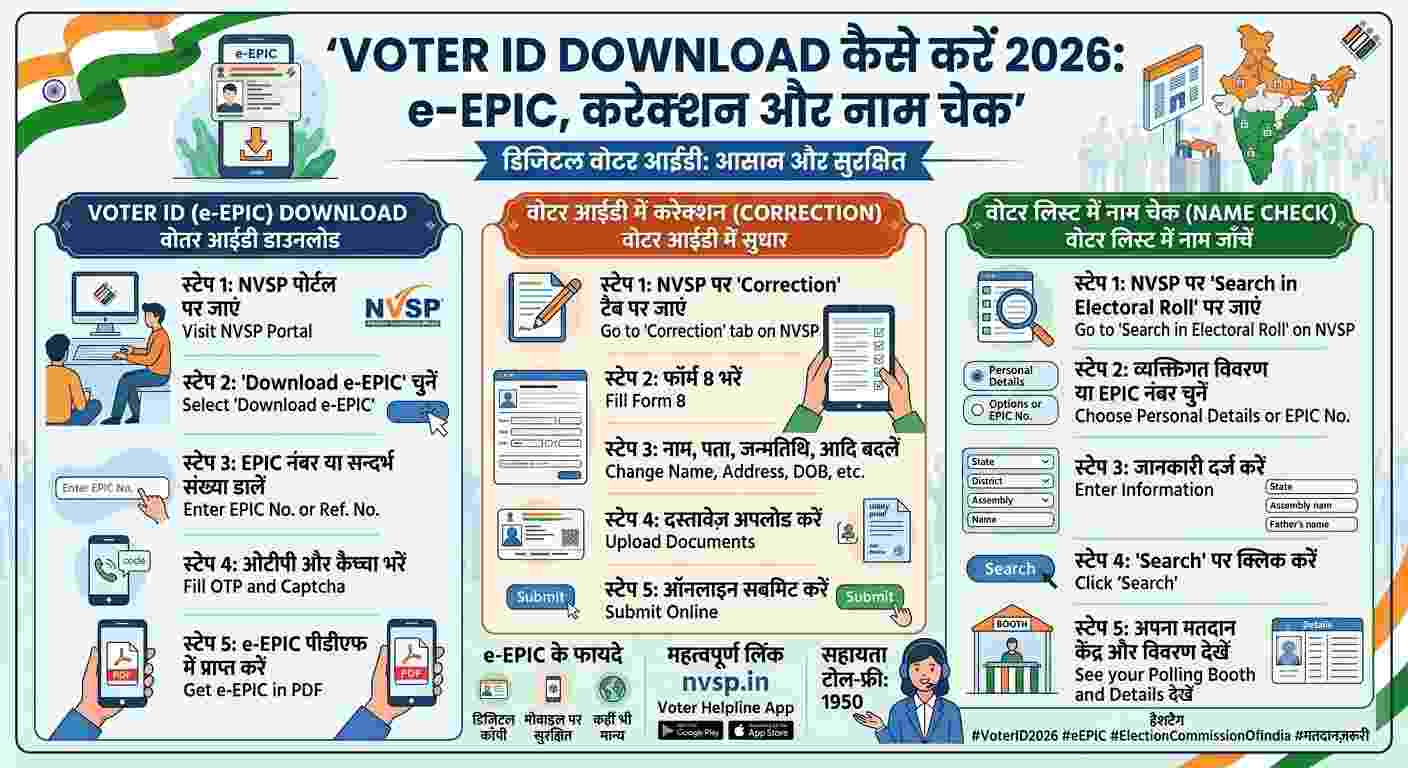
The Election Commission of India has made the democratic processes completely digital and transparent for the citizens of the country. Now the hassle of visiting government offices or relying on BLO for Voter ID card is over. Through the official portal of the Election Commission and the Voter Helpline mobile app, any Indian citizen can download their secure, digitally signed and QR code enabled electronic voter card i.e. e-EPIC on their phone or computer in a matter of moments. From voters of Lucknow, the capital of Uttar Pradesh, to citizens of any state or union territory of the country, they can avail this facility 24 hours. This digital voter card is not only 100% legally valid for voting in all types of elections, but is also accepted as a strong proof of identity and address for opening a bank account, applying for a passport, getting a SIM card or any other government work. Its biggest feature is that it is downloaded in PDF format, which you can keep safe in DigiLocker or get it laminated and keep it in your pocket if needed.
The most mandatory condition for downloading Digital Voter ID is that your current mobile number should be linked with your voter card record. To download e-EPIC, first go to the official portal of Election Commission of India. If you are visiting this portal for the first time, create a new account with the help of your mobile number and OTP or login using your existing password and captcha code. After login, click on the option of ‘E-EPIC Download’ visible on the dashboard. Here you will see two options—either you can enter your 10-digit Voter ID number (EPIC Number), or you can enter the form reference number provided to you if you have recently applied for a new card. After this select your respective state from the drop-down menu and click on the search button. Your name, father or husband’s name and assembly constituency will be displayed on the screen. The option of ‘Send OTP’ will appear just below this. As soon as you click on it, a 6 digit one time password will be sent to your registered mobile. As soon as you submit it, your digital voter card will be downloaded in PDF form. If the downloaded PDF file is secure, its password is usually your date of birth (without spaces or slashes, such as DDMMYYYY).
If you don’t remember your Voter ID number, have lost your old card, or just want to verify whether your name is included in the current Electoral Roll, the Election Commission’s Electoral Search tool comes in handy. For this, go to the official search portal where you get three easy options. The first method is Search by Details, in which you have to fill your full name, father or relative’s name, age or date of birth, gender, state, district and name of your assembly correctly. The second and easiest method is Search by Mobile, in which you just have to enter your registered mobile number, verify the OTP and all the records related to your name appear on the screen instantly. The third method is to search directly by entering the Voter ID number (EPIC). As soon as the search results appear, you will clearly see your EPIC number, Part Number, Serial Number and your designated Polling Station. From here you can also download your Voter Information Slip directly.
Often problems like spelling of name, date of birth, relative’s name, address or old blurred photo are seen in the old voter card. If the mobile number is not linked in your record, you will still not be able to download e-EPIC. The only solution to all these problems is ‘Form 8’. To fill Form 8, login to the portal and go to the section ‘Shifting of residence/correction of entries in existing electoral roll’. Proceed by entering your EPIC number here. For correction, tick the option ‘Correction of Entries’. After this, select only those columns for the details you want to change—like name, gender, date of birth, relationship type, mobile number, address or latest color photo. Upload clear photographs or PDF of valid documents (like Aadhaar Card, High School Marksheet, PAN Card, Passport or Bank Passbook) in support of the details chosen. If only mobile number is to be updated, no documents are required, only the new number has to be entered and verified with OTP. As soon as you submit the form, a unique reference number will be generated on the screen, through which you can check the status of your application by going to ‘Track Application Status’. After verification by the concerned BLO and Electoral Registration Officer (ERO), your record is updated and the new e-EPIC is ready for instant download.
If you have completed 18 years of age or have not yet made your voter card, then you can register as a new voter sitting at home. For this, ‘Form 6’ is available on the portal. While filling Form 6 you have to upload your basic details, current address and a passport size clear color photograph. Aadhar card, birth certificate, PAN card, driving license or 10th mark sheet are valid for proof of age. Aadhaar card, electricity bill, water bill, gas connection book or bank passbook can be used for address proof. Your name gets added to the voter list within a few weeks of form submission and the physical Smart PVC Voter Card is also sent to the registered address via speed post, while the digital copy can be downloaded online on the same day.